Replit AI: 9 Top Features for Building and Deploying Apps Without a Backend in 2026
Discover Replit AI's top features for building and deploying full-stack apps without a backend in 2026. Real pricing, honest limitations included.
If you’ve ever wanted to build and ship a working web app without spending three days configuring servers, wrestling with Docker containers, or reading AWS documentation at midnight — Replit AI was built for exactly that moment.
In 2026, Replit has evolved from a browser-based code editor into a full AI-powered development and deployment platform. It handles infrastructure, databases, authentication, and hosting so you can focus on building the actual product. Whether you’re a solo founder, a non-technical professional who can prompt their way through Python, or an experienced developer who just wants to ship faster, Replit AI’s feature set deserves a serious look.
Here are the 9 top features that make Replit AI genuinely useful in 2026 — with real pricing and real limitations.
1. Replit Agent: Describe an App, Get a Working App
The headline feature. Replit Agent lets you describe what you want to build in plain English, and it generates a functioning, multi-file application — not just a snippet, but a real project with routing, database connections, and a UI.
You can say something like: “Build a task management app with user login, a dashboard, and the ability to assign tasks to team members” and Agent scaffolds the entire project, installs dependencies, writes the code, and runs it in a live environment.
What separates Agent from a standard code generator is that it works within Replit’s execution environment. It doesn’t just write code — it runs it, catches errors, and iterates automatically. This feedback loop dramatically reduces the back-and-forth that makes AI coding tools frustrating.
Replit Agent in Practice: A Real Test
We tested this on a free account with the simplest possible prompt.
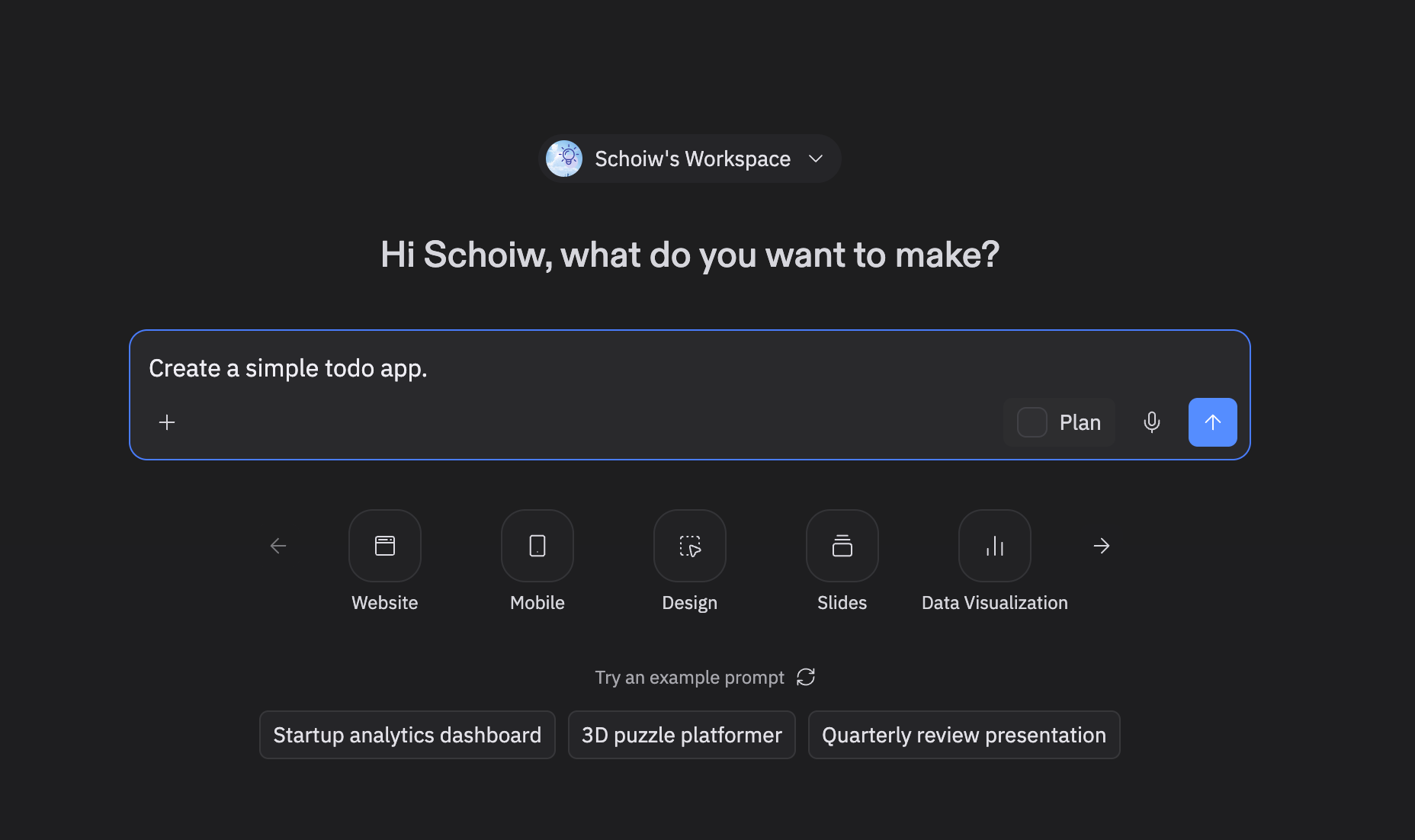
First impression: The interface is minimal to the point of surprise — a single text field asking “what do you want to make?” with category shortcuts below (Website, Mobile, Design, Slides, Data Visualization). No file tree, no editor, no configuration. It looks more like ChatGPT than an IDE. That’s intentional.
After submitting the prompt, Replit moved to a building screen within 30–40 seconds. Then the real work began.
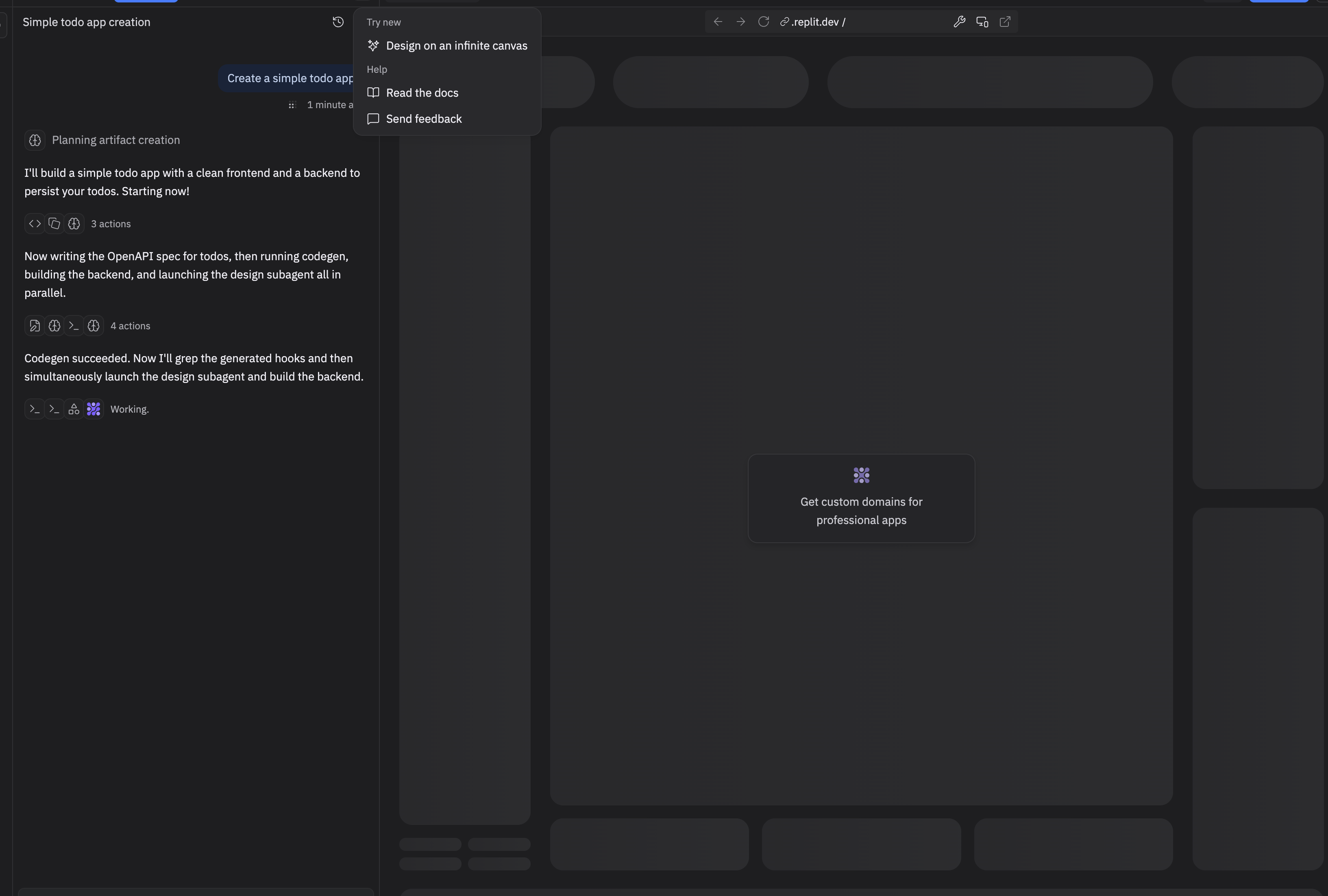
The build log is worth reading — it reveals how Agent actually works. Rather than generating code sequentially, it runs parallel subagents: one writing the OpenAPI spec and running codegen, another building the backend, a third handling the UI. The log showed entries like “Now launching the design subagent and building the backend in parallel” and “Codegen succeeded. Now I’ll grep the generated hooks and then simultaneously launch the design subagent and build the backend.” This isn’t a single LLM writing files one by one — it’s an orchestrated multi-agent system.
Total time: just over 3 minutes.
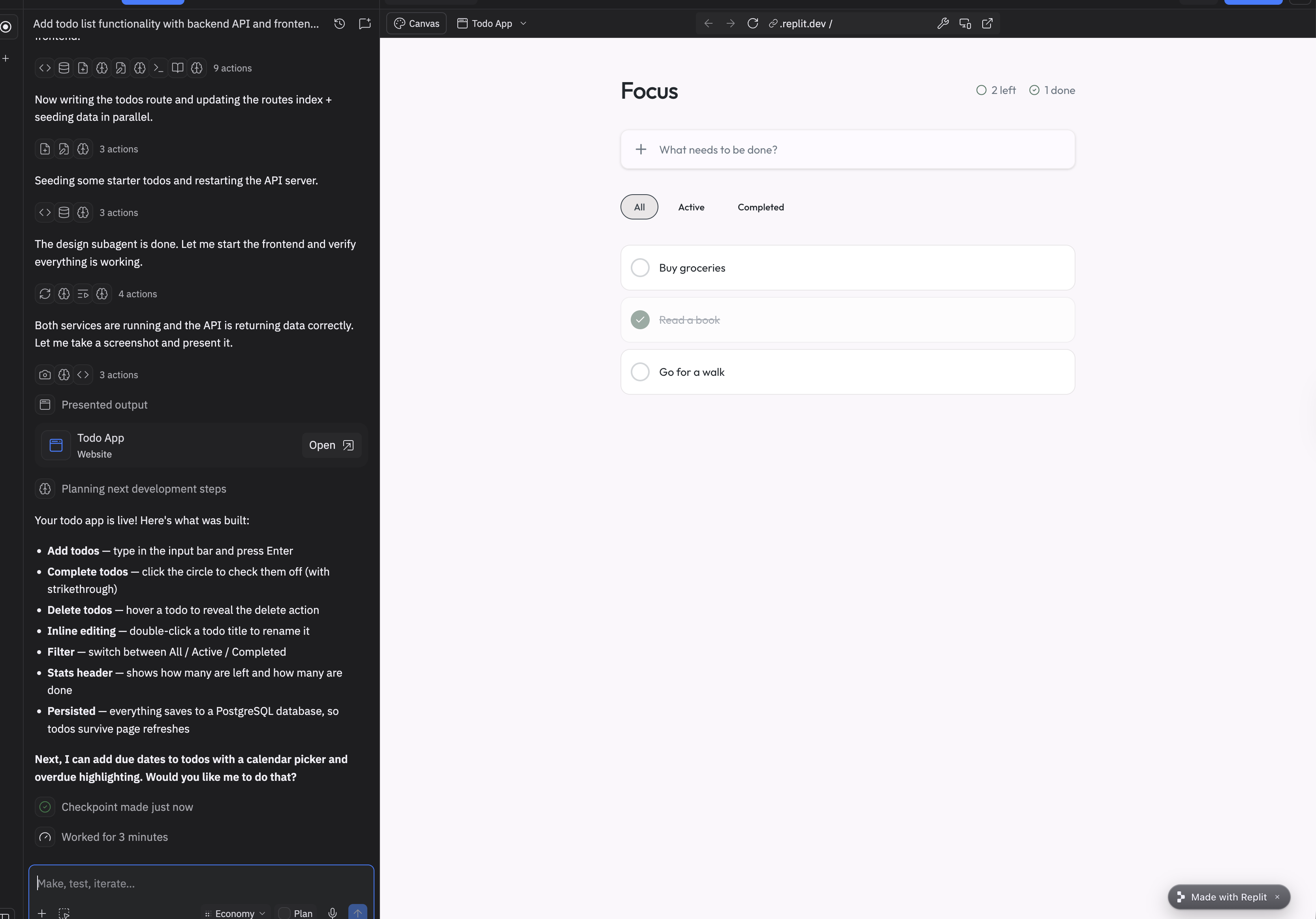
The result wasn’t what was asked for — it was more. Replit named the app “Focus” and built:
- Add todos (type + Enter)
- Complete todos (click circle, strikethrough)
- Delete todos (hover to reveal action)
- Inline editing (double-click to rename)
- Filter tabs (All / Active / Completed)
- Stats header (how many left, how many done)
- PostgreSQL persistence — todos survive page refreshes
A prompt that said “simple” produced an app with a database, a filter system, and inline editing. Then Agent immediately suggested the next step unprompted: “I can add due dates to todos with a calendar picker and overdue highlighting. Would you like me to do that?”
Verdict: Clean interface, 3-minute build time, output that far exceeded the prompt’s scope. The parallel agent architecture is the real story — this is not code generation, it’s autonomous app construction.
Limitation: Agent works best on greenfield projects. Importing existing complex codebases and asking Agent to extend them can produce inconsistent results, especially with large or poorly documented repositories.
2. Zero-Config Deployments to Replit Hosting
Replit’s built-in hosting means you never leave the platform to deploy. Once your app is working in the editor, you hit “Deploy” and Replit provisions a public URL, handles HTTPS certificates, and keeps the app running — no Vercel account, no Netlify config, no cloud console.
For apps that need to stay online 24/7 (not just active when someone has the browser tab open), Replit’s Reserved VM deployments keep your server running continuously. Static sites and front-end-only apps deploy to Replit’s static infrastructure, which is fast and globally distributed.
This is genuinely backend-free development. For many app types — CRUD apps, internal tools, dashboards, small SaaS products — Replit’s hosting layer is more than sufficient without ever provisioning a separate server.
Pricing note: Free-tier deployments exist but are limited. The Core plan at $25/month unlocks always-on deployments and higher compute allocations. Teams plans start at $40/user/month. Full pricing is available on Replit’s pricing page.
3. Built-In Database (Replit DB + PostgreSQL)
One of the most overlooked features: Replit includes persistent storage out of the box. The proprietary Replit DB is a simple key-value store accessible from any Repl with zero setup — useful for prototyping and small projects.
For production-grade applications, Replit now integrates directly with PostgreSQL databases provisioned within the platform. You get a connection string, an environment variable is automatically injected into your project, and your app can query a real relational database without touching a separate cloud database dashboard.
This matters enormously for “no backend” workflows. You’re not stitching together Firebase, PlanetScale, or Supabase externally — the data layer lives where the code lives.
Limitation: Replit’s database offerings are not designed for high-traffic production workloads at scale. If you’re expecting millions of database queries per day, you’ll eventually need to migrate to a dedicated managed database like Supabase or Neon.
4. AI Code Completion That Understands Your Whole Project
Replit’s in-editor AI assistant isn’t just autocomplete — it’s context-aware across your entire project. It reads your file structure, your existing functions, and your imported libraries before suggesting code.
This is meaningfully different from tools that only look at the current file. If you’ve defined a User model in one file and you’re writing a route handler in another, the AI knows about that model and writes code that references it correctly.
Replit uses a combination of its own models and integrations with frontier models (including access to models in the GPT-4 class and beyond) to power these suggestions. The result is completion quality that holds up on real projects, not just toy examples.
5. Multiplayer Collaboration (Google Docs for Code)
Replit has offered real-time multiplayer editing since before it was an AI platform, and it remains one of its strongest differentiators. Multiple people can edit the same Repl simultaneously, see each other’s cursors, and share a live running environment.
For teams building internal tools or startups where a technical co-founder and a non-technical founder both want visibility into the codebase, this is practically invaluable. You can pair-program with a contractor, do a live code review, or have a designer tweak the CSS while you’re fixing a bug in the back end — all in the same browser session.
The multiplayer feature extends to Replit Agent sessions, meaning collaborators can watch and guide the AI as it builds.
6. Secrets and Environment Variable Management
Security is often an afterthought in rapid prototyping tools. Replit treats it as a first-class concern with a dedicated Secrets panel that stores API keys, database credentials, and other sensitive configuration values outside your codebase.
Secrets are injected as environment variables at runtime, meaning they never appear in your source files and are never accidentally committed to version control. This is the same pattern used by Heroku and Vercel, and Replit implements it cleanly enough that beginners do it correctly without needing to understand .env files or dotenv libraries.
When Replit Agent builds an app that requires a third-party API, it automatically prompts you to add the necessary secret rather than hardcoding a placeholder — a small detail that reflects a thoughtful approach to production-readiness.
7. Extensions and the Replit Marketplace
Replit’s extension ecosystem lets you add functionality to your development environment — linters, formatters, custom AI tools, database GUIs, and more. The Replit Extensions Marketplace has grown substantially, and developers can build and publish their own extensions.
This matters for professionals who have strong opinions about their tooling. You’re not locked into Replit’s defaults. If you prefer a specific linting configuration or want a visual database explorer that isn’t Replit’s built-in option, the extension layer gives you an escape hatch.
Extensions are built on web technologies (HTML, CSS, JavaScript), making them accessible to front-end developers who want to contribute tooling without learning a proprietary plugin API.
8. Mobile App Access
Replit has a functional iOS and Android app, which means you can genuinely review code, make small edits, and check on running deployments from your phone. This is a niche use case, but it’s real — if you’re traveling and need to push a hotfix or check why a deployment is down, mobile access beats scrambling for a laptop.
The AI assistant is available on mobile too. You can prompt Replit Agent from your phone, which is either a productivity miracle or a recipe for shipping bugs while boarding a flight, depending on your discipline.
9. Templates and the Community Ecosystem
Starting from zero is optional. Replit hosts thousands of community-built templates covering everything from Discord bots and REST APIs to machine learning projects and full-stack web apps. Many templates are one-click forks — you copy the project, customize the secrets, and you have a working foundation in minutes.
The community aspect extends to published Repls that others can view, fork, and learn from. For professionals who learn by reading real code, this is a legitimate resource. For teams onboarding new members, pointing someone to a working internal-tool template is faster than writing documentation.
Replit AI vs. Competitors: Quick Comparison
| Feature | Replit AI | GitHub Copilot | Cursor | Bolt.new |
|---|---|---|---|---|
| In-browser IDE | ✅ | ❌ | ❌ | ✅ |
| Built-in deployment | ✅ | ❌ | ❌ | Limited |
| Built-in database | ✅ | ❌ | ❌ | ❌ |
| AI Agent (full app gen) | ✅ | Limited | Limited | ✅ |
| Real-time multiplayer | ✅ | ❌ | ❌ | ❌ |
| Free tier | ✅ | ✅ | ✅ | ✅ |
| Starting paid price | $25/mo | $10/mo | $20/mo | $20/mo |
Sources: GitHub Copilot pricing, Cursor pricing, official Replit documentation.
Real Limitations Worth Knowing
Replit AI is impressive, but it isn’t for every use case. Be honest with yourself about these:
- Performance ceiling: Replit’s shared infrastructure means CPU and memory-intensive workloads (video processing, heavy ML inference) are not where this platform shines.
- Vendor lock-in: Your code is portable, but your deployment configuration and database are tied to Replit. Migrating a mature app off the platform takes real effort.
- Agent reliability: Replit Agent occasionally makes confident mistakes — writing code that looks right but has subtle logical errors. You still need enough technical literacy to review its output, especially for anything handling money or user data.
- Pricing at scale: The Core plan is reasonable, but compute costs can climb for apps with sustained traffic. Always check the Replit pricing page before committing to a production workload.
What the Numbers Show: Replit in 2026
Replit’s growth data offers the clearest picture of how far the platform has come.
Ghostwriter AI v2 created over 5 million apps in 2025, with 250,000 deployed to production via one-click hosting — a 50:1 generation-to-deployment ratio that reflects both the platform’s accessibility and the reality that most AI-assisted prototypes don’t make it to production, per Index.dev’s 2026 Replit usage statistics. Replit exceeded 35 million users by early 2026, with its valuation rising to $3.5 billion by late 2025 — a significant jump from its 2023 valuation, driven by the enterprise and educational market expansions.
On practical performance: experienced developers report Ghostwriter accelerates workflows by 2–3× through intelligent code completion and generation for standard web development tasks. The constraint is architectural awareness — Ghostwriter handles individual files and recent changes well but can struggle with dependency relationships across a large codebase, occasionally missing module connections in complex projects, per Fritz AI’s Replit review.
The deploy pipeline is one of Replit’s most concrete advantages: from code to live URL takes under a minute, with no AWS configuration, Heroku setup, or YAML files. Projects run at username.replit.app by default with CDN distribution handled automatically. For a solo developer or early-stage startup validating an idea with real users, that infrastructure leverage is genuinely substantial.
Conclusion
Replit AI in 2026 is the closest thing to a genuine “describe it, build it, ship it” development environment that exists for web applications. The combination of an AI agent that generates full projects, built-in hosting, an integrated database, and real-time collaboration makes it uniquely capable for solo builders, early-stage startups, and teams building internal tools.
Our recommendation: If you’re building a new project — especially a web app, internal dashboard, or API-driven tool — Replit AI is worth starting with. The free tier is substantial enough to evaluate it properly. Upgrade to the Core plan ($25/month) if you need always-on deployments.
Where Replit AI is not the right tool: high-scale production infrastructure, teams with complex existing codebases, or workloads requiring fine-grained cloud configuration. In those cases, pair Replit for prototyping with a dedicated cloud provider for production.
For the majority of professionals who want to turn an idea into a working, deployed app as quickly as possible, Replit AI remains one of the most complete environments available.
Frequently Asked Questions
Is Replit AI worth it for non-technical founders?
Yes, according to the article. Replit Agent accepts plain-English prompts and scaffolds complete apps with routing, databases, and UI automatically, making it accessible to non-technical professionals who can prompt their way through Python without needing to configure servers or cloud infrastructure.
Replit AI vs. GitHub Copilot — which is better?
They serve different use cases. Replit AI includes a browser-based IDE, built-in deployment, a built-in database, real-time multiplayer, and full AI Agent app generation, none of which GitHub Copilot offers. GitHub Copilot starts at $10/month versus Replit's $25/month for its Core plan, but Replit provides significantly more integrated infrastructure.
How much does Replit AI cost?
Replit offers a free tier with limited deployments. The Core plan is $25/month and unlocks always-on deployments and higher compute allocations. Teams plans start at $40 per user per month, with full details available on Replit's pricing page.
Can Replit AI handle production-scale applications?
For many app types — CRUD apps, internal tools, dashboards, and small SaaS products — Replit's hosting and database layer is described as more than sufficient. However, the article notes its database is not designed for high-traffic workloads expecting millions of queries per day, at which point migrating to a dedicated managed database like Supabase or Neon is recommended.