Grammarly vs Hemingway Editor: Same Text, Wildly Different Verdicts — Which One Should Bloggers Trust?
Grammarly scores your writing 91/100. Hemingway says every sentence is unreadable. We tested both tools on identical text to find out which writing tool is actually right.
You paste the same paragraph into two different tools. One gives it a 91 out of 100 and flags a single suggestion. The other highlights every sentence in red and tells you your writing is “Post-graduate” level — and not in a good way. Both tools are supposed to help you write better. So which one is actually right?
That’s the real question behind the Grammarly vs Hemingway Editor debate, and after running a head-to-head test on identical text, the answer turns out to be more interesting than a simple winner.
What Each Tool Is Actually Trying to Do
Before looking at the scores, it helps to understand what problem each tool was designed to solve — because they’re not solving the same one.
Grammarly is a grammar and writing assistant built around correctness. It checks spelling, punctuation, grammar, word choice, tone, and clarity. The AI layer suggests rewrites, flags passive voice, and catches the kind of errors a fast typist misses. It’s comprehensive, polished, and increasingly AI-powered — its latest suggestions don’t just flag problems, they propose full-paragraph rewrites.
Hemingway Editor is a readability tool named after Ernest Hemingway, whose prose style was defined by short sentences, plain words, and zero filler. It doesn’t check grammar. Instead, it color-codes your text by problem type — sentences that are too long, passive voice, adverbs, and phrases with simpler alternatives — and gives your writing a reading-grade level score. The goal is ruthless simplicity.
Same surface area (editing tools), completely different philosophies.
The Test
We ran a 200-word paragraph on remote work trends through both tools simultaneously, without changing a single word between tests. Here’s what happened.
Grammarly’s Verdict: 91/100
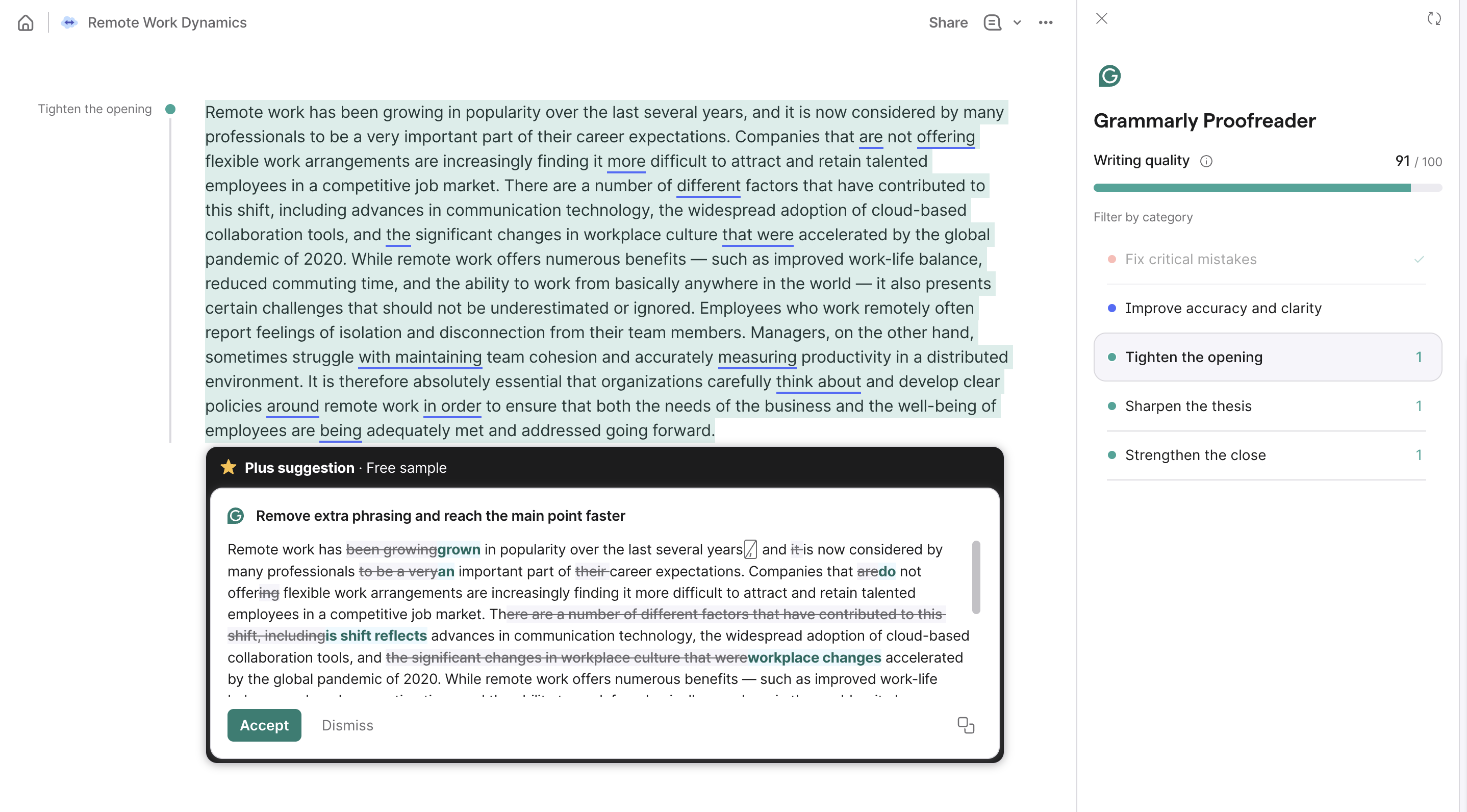
Grammarly scored the paragraph 91 out of 100. No critical errors. One accuracy and clarity flag. Under “Increase the impact of your text,” it surfaced three style suggestions: tighten the opening, sharpen the thesis, strengthen the close.
The one concrete suggestion it showed was a full rewrite of the final sentence — cutting redundant phrasing (“think about and develop”), replacing “around” with “on,” dropping “in order to,” and removing the dangling “being.” The rewrite was noticeably tighter. But the overall verdict? High score, a handful of optional polish notes, nothing alarming.
Hemingway’s Verdict: Post-graduate (Poor — Aim for Grade 9)
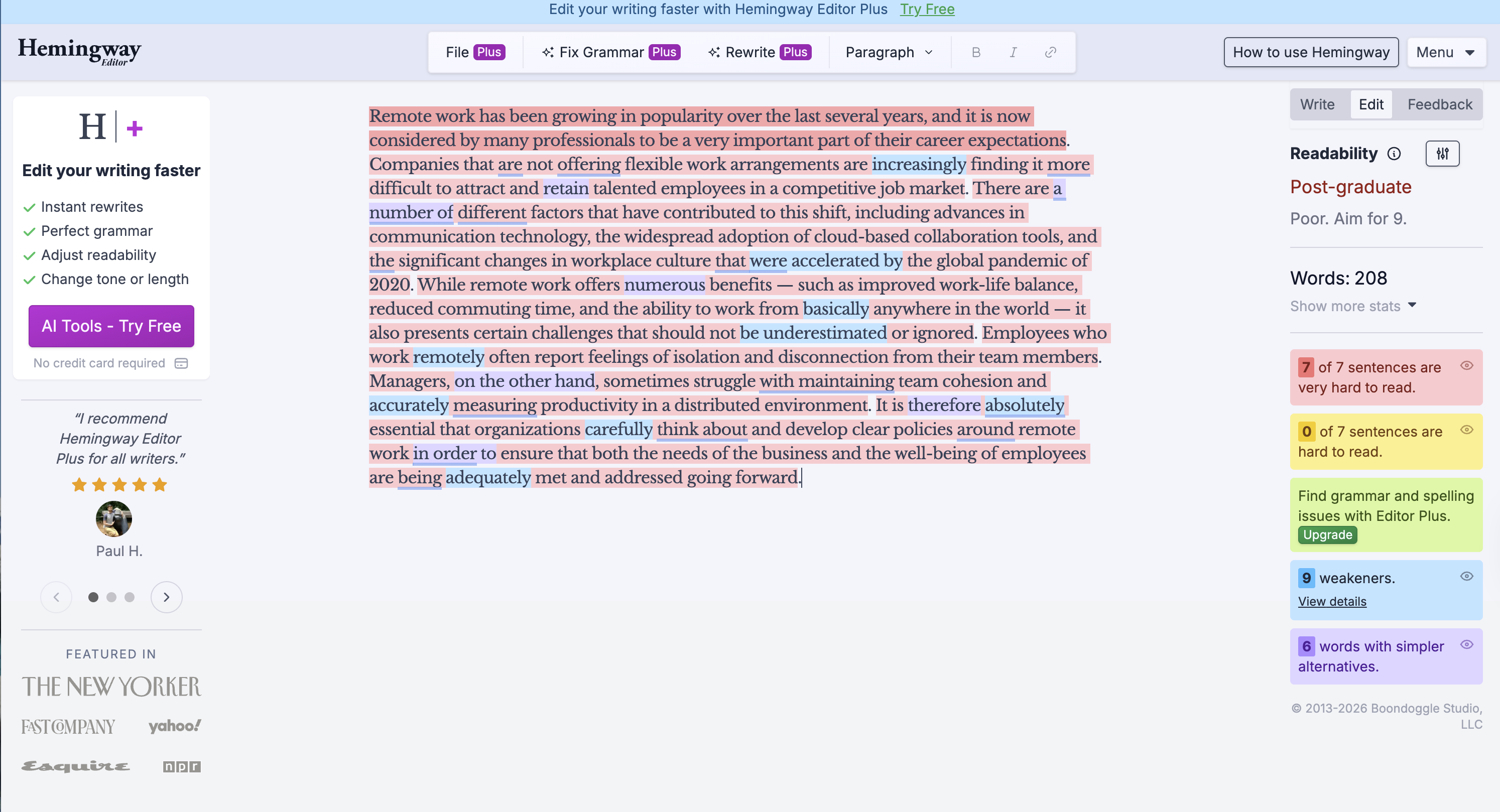
Hemingway flagged every single sentence. Not some — all 7 of 7 were rated “very hard to read” and highlighted in red. The readability grade came in at Post-graduate, with the instruction to aim for Grade 9 (the sweet spot for general web content). It also caught:
- 9 weakeners — adverbs and hedge words like very, basically, absolutely, increasingly, numerous, adequately
- 6 words with simpler alternatives
- Multiple passive constructions throughout
The entire 208-word paragraph was essentially one long flag. Hemingway’s verdict: this text is not readable for a general audience.
Why the Scores Are So Different
This isn’t a flaw in either tool — it’s by design.
Grammarly’s 91/100 measures correctness and clarity relative to standard writing conventions. The paragraph has no spelling errors, no grammar mistakes, and makes logical sense. On those terms, 91 is accurate.
Hemingway’s “Post-graduate” measures something else entirely: how easily a general reader can process the text in real time. Long sentences that pack multiple clauses together are cognitively expensive, even when they’re grammatically perfect. Hemingway doesn’t care if the sentence is correct — it cares whether your reader has to stop and re-read it.
For bloggers writing to a general internet audience, Hemingway’s metric is arguably the one that matters more. Most online readers skim. Sentences that require multiple passes to parse will lose them before the end of the paragraph.
What Each Tool Actually Catches
| Grammarly | Hemingway | |
|---|---|---|
| Grammar errors | ✅ Strong | ❌ Not its job |
| Spelling | ✅ | ❌ |
| Sentence length / complexity | ⚠️ Partial | ✅ Core feature |
| Adverbs / weakeners | ⚠️ Occasionally | ✅ Always |
| Passive voice | ✅ | ✅ |
| Readability grade | ❌ | ✅ |
| Rewrite suggestions | ✅ AI-powered | ❌ Manual |
| Tone detection | ✅ | ❌ |
| Plagiarism check | ✅ (paid) | ❌ |
When to Use Each Tool
Use Grammarly when:
- You’re proofreading a draft for errors before publishing
- You need tone suggestions (formal vs. casual, confident vs. hedged)
- You want AI-generated rewrite options to choose from
- The writing involves technical terminology or proper nouns that require context
- You’re editing someone else’s work and need to explain why a change is better
Use Hemingway when:
- You want to know if your writing is readable for a general audience
- You’re a naturally verbose writer who defaults to long, complex sentences
- You’re targeting a blog audience (Grade 6–9 is the sweet spot for web content)
- You’ve already proofread and want a second pass focused purely on clarity
- You want to kill adverbs — Hemingway is merciless about this
The most effective workflow is both, in sequence: write → Grammarly (correctness) → Hemingway (readability). They’re not competitors so much as two different editing passes.
Pricing: A Clear Advantage for Hemingway
This is where Hemingway makes a compelling case that’s easy to overlook in the Grammarly vs Hemingway debate.
Grammarly:
- Free tier: grammar and spelling checks only
- Grammarly Pro: ~$12/month (billed annually) — unlocks clarity rewrites, tone detection, full suggestion suite
- Business plan: ~$15/month per member
Hemingway Editor:
- Web version: free (full feature access, no account required)
- Desktop app: $19.99 one-time payment — no subscription, no renewal
If your primary concern is sentence-level readability, Hemingway’s free web version does everything you need. The desktop app is a permanent purchase with no recurring cost — unusual in a market where everything has moved to subscriptions.
For bloggers who need grammar checking and AI rewrites, Grammarly Pro is hard to skip. But for readability feedback alone, Hemingway is essentially free.
The Honest Limitation of Both Tools
Neither tool tells you whether your writing is interesting. A paragraph can pass Grammarly’s correctness check and hit Grade 7 on Hemingway and still be completely forgettable. Both tools optimize for the absence of problems — they can’t tell you if the argument is compelling, the opening is hooked, or the conclusion lands.
Grammarly’s “Strengthen the close” suggestion in our test is the closest either tool gets to this kind of feedback, but it’s structural rather than strategic. It flags a weak ending without telling you what would make it strong.
That gap is where editorial judgment — human or AI — still matters. Tools like ChatGPT Plus or Claude can give you feedback on argument structure, voice consistency, and whether an opening earns the reader’s attention. Grammarly and Hemingway are editing tools, not thinking tools.
Bottom Line
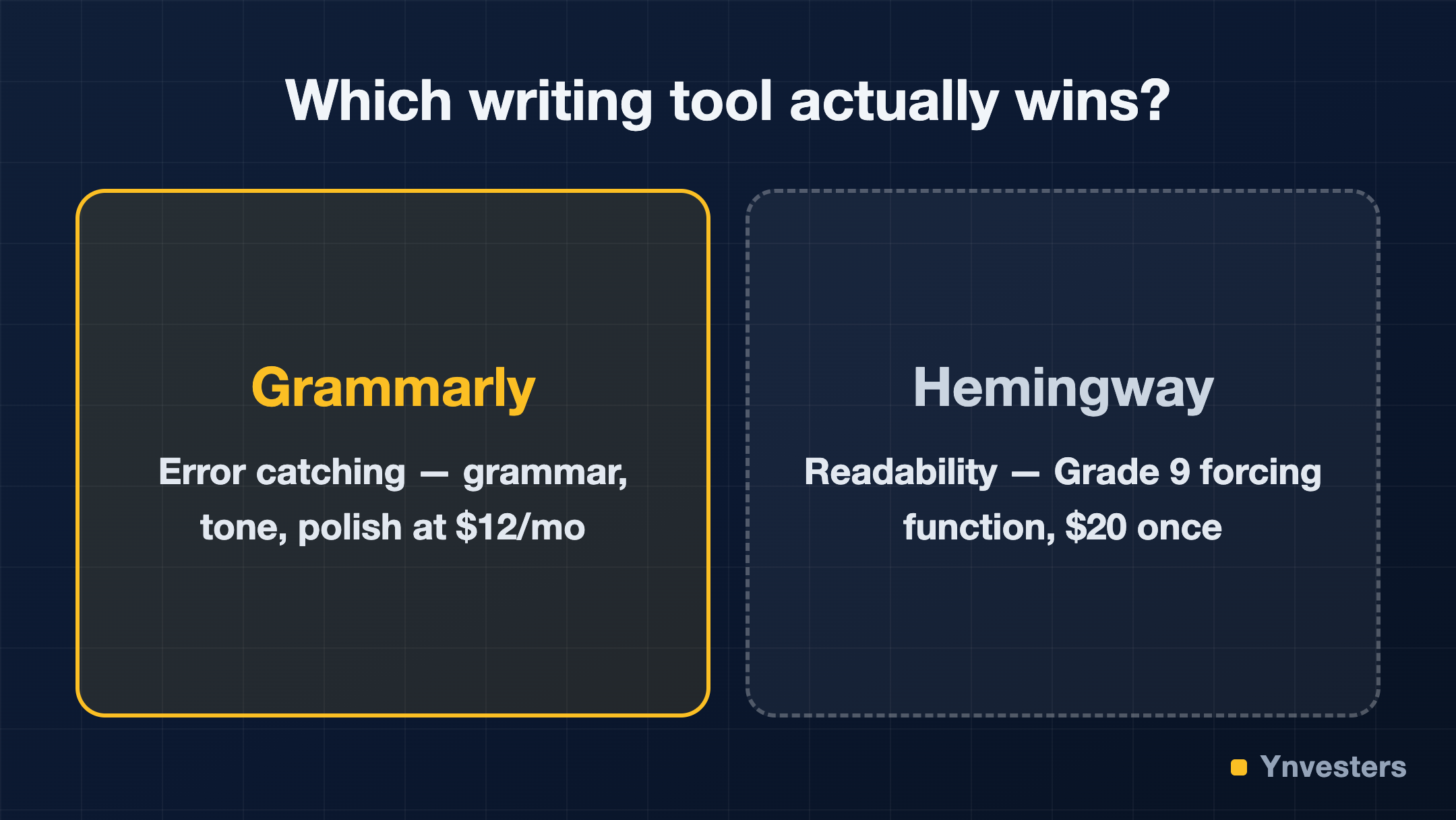
For catching errors: Grammarly wins, and it’s not close. Hemingway doesn’t check grammar at all.
For readable prose: Hemingway wins. Its Grade 9 benchmark is a real forcing function that produces text general audiences can actually process. Grammarly’s 91/100 won’t warn you that your paragraph will lose half your readers before the second sentence.
For price: Hemingway wins easily. Free web version, $20 one-time for the app. Grammarly Pro is $12+/month.
For bloggers: Use both. Grammarly as your proofreader, Hemingway as your readability mirror. The same paragraph that Grammarly calls near-perfect, Hemingway will show you where your readers are likely to drop off. Both pieces of feedback are useful. Neither alone is enough.
The tools don’t disagree with each other — they’re measuring different things. Once you understand that, using both together is obvious.
Our take for bloggers paying out of pocket: pay Hemingway’s $20 one-time without a second thought — it’s the cheapest permanent upgrade your prose will ever get. Add Grammarly Pro at $12/month the month your writing starts earning; until then, Hemingway’s free web editor covers more than most writers admit.
Frequently Asked Questions
Is Hemingway Editor worth it for bloggers?
Yes — the free web version gives full readability feedback with no account required, and the desktop app is a one-time $19.99 purchase with no subscription. The article calls it 'the cheapest permanent upgrade your prose will ever get.'
Grammarly vs Hemingway Editor — which is better?
Neither is strictly better; they serve different purposes. Grammarly wins for catching errors and offering AI-powered rewrites, while Hemingway wins for readability scoring and forcing simpler, shorter sentences suited to general web audiences.
How much does Grammarly Pro cost?
According to the article, Grammarly Pro costs approximately $12/month billed annually, with a Business plan at approximately $15/month per member. A free tier is available but limited to grammar and spelling checks only.
Can I use Grammarly and Hemingway Editor together?
Yes — the article explicitly recommends it. The suggested workflow is: write, then run Grammarly for correctness, then Hemingway for readability. The same paragraph can score near-perfect on Grammarly while still being flagged entirely by Hemingway, so both passes provide distinct value.